Paint on Shape

[Home]   [Puzzles & Projects]    [Delphi Techniques]   [Math Topics]   [Library]   [Utilities]

Search


Search DelphiForFun.org only

Support DFF

 If you benefit from the website,  in terms of knowledge, entertainment value, or something otherwise useful, consider making a donation via PayPal  to help defray the costs.  (No PayPal account necessary to donate via credit card.)  Transaction is secure.


If you shop at Amazon anyway,  consider using this link. We receive a few cents from each purchase.   Thanks.

In Association with Amazon.com


Contact

Feedback:  Send an e-mail with your comments about this program (or anything else).
 

Search DelphiForFun.org only


Problem Description

Here is a program that  demonstrates how to add an "OnPaint" event to a TGraphic control which does not have that event defined.  Specifically the problem is to to add an identifying name or number to TShape controls.  


Background & Techniques

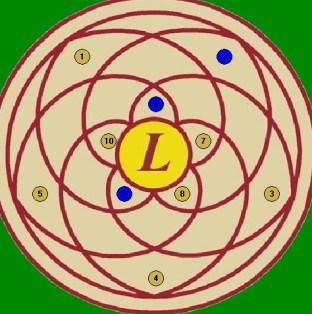
I recently became involved in an interesting project to design software to drive nozzles for a children's water fountain.  We do not have the Digital IO card or the solenoids yet, but I decided to write a simulator to  help my buddy define locations and trial "scripts" to drive the fountain.  I am representing the nozzles with TShape controls but needed to identify each with a number.  An OnPaint event exit was the logical way to do this, but TShape does not support that event.

Here is a summary of the steps necessary to add the feature:

  • Define a new class derived from the control.  in this case:
    •  TNozzle = class(TShape)
  • Expose FOnPaint and Paint methods for the new class
    • private
           FOnpaint:TNotifyEvent;
      protected
           procedure Paint; override;
  • Publish the OnPaint event property as a new event to make it accessible to the using program:
    •  published
          property OnPaint: TNotifyEvent read FOnPaint write FOnPaint;
  • Add a line to the Paint method to check for assignment and call FOnPaint inherited paint;
    • procedure TNozzle.Paint;
      begin
          inherited paint; {Let TShape paint do its thing}
          if assigned(FOnPaint) then FonPaint(self); {call our paint event}
      end;
  • The new class could be installed as a new component based on the above four steps. I prefer to reintroduce the Create constructor to pass  additional initial property values and to use the existing graphic control as a "prototype" to source the new pertinent properties such as owner, parent, left, top, height, width, shape, color, etc. for the new control. This allows us to use Delphi's IDE to visually define the the characteristics we want.   The prototype control may be freed after transferring its properties to the new control;
    • constructor create(NewNozzleId:integer; s:TShape); reintroduce;
  •  6. Define your own OnPaint TNotifyEvent and assign it to OnPaint as new control is initialized.
    • procedure TForm1.NozzlePaint(Sender: TObject);
      begin
        With TNozzle(sender), canvas do
        begin
           {Draw NozzleId in center of the nozzle}
           textout(width div 2 -4, height div 2 -4,nozzleId);
        end
      end;
       

A similar technique could be used to customize the appearance of  TLabel or TBevel controls, both TGraphic descendents without an OnPaint event..

Running/Exploring the Program 


Original Date: August 21,2006

Modified: May 18, 2009


  [Feedback]   [Newsletters (subscribe/view)] [About me]
Copyright © 2000-2009, Gary Darby    All rights reserved.