Search
As of October, 2016, Embarcadero is offering a free release
of Delphi (Delphi
10.1 Berlin Starter Edition ). There
are a few restrictions, but it is a welcome step toward making
more programmers aware of the joys of Delphi. They do say
"Offer may be withdrawn at any time", so don't delay if you want
to check it out. Please use the
feedback link to let
me know if the link stops working.
Support DFF - Shop
If you shop at Amazon anyway, consider
using this link.
We receive a few cents from each
purchase. Thanks
Support DFF - Donate
If you benefit from the website, in terms of
knowledge, entertainment value, or something otherwise useful,
consider making a donation via PayPal to help defray the
costs. (No PayPal account necessary to donate via credit
card.) Transaction is secure.
Mensa®
Daily Puzzlers
For over 15 years
Mensa Page-A-Day calendars have provided several puzzles a year
for my programming pleasure. Coding "solvers" is most fun,
but many programs also allow user solving, convenient for "fill
in the blanks" type. Below are Amazon links to the
two most recent years.
Mensa®
365 Puzzlers Calendar 2017
Mensa®
365 Puzzlers Calendar 2018

(Hint: If you can
wait, current year calendars are usually on sale in January.)
Contact
Feedback:
Send an
e-mail with your comments about this program (or anything else).
|
| |
Problem Description
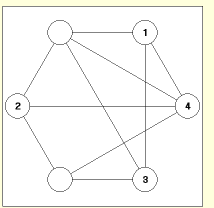
Each circle in this diagram is
connected to several others by straight lines.
The objective of the puzzle is to insert one of
the digits 1 through 6 into each of the circles
in such a way that no number is connected by
a line to a numerically adjacent number. For example, 1 cannot connect to 2; 2 cannot
connect to 1 or 3; 3 cannot connect to 2 or 4,
etc.
Stuck again!
Background & Techniques
I ran across this puzzle the other day in my "Future Projects" folder,
one of the hundred or so residing there. I don't remember where
it came from, probably one of my puzzle books. If any viewer
recognizes it, I'd appreciate feedback so i can give proper credit.
To play my version, click a circle, then enter a digit 1
though 6 using the keyboard. Clicking a circle already containing a number will remove it.
Clicking a number that makes a "forbidden" connection will give an error
message. If you give up, hints for either of the two related solutions
can be displayed by clicking on the appropriate display line.
Non-programmers are welcome to read on, but may
want to skip to the bottom of this page to download
executable version of the program.
Notes for Programmers:
Here are the major sub-problems to be solved:
- Find the solutions:. This is the only part of the puzzle that had
been solved when Io resurrected. "Adjacents" is an array of
integer pairs indentifying the endpoint circles for each connecting
line. Recursive function Permute is called from the
FormActivate exit to generate all 720 permutations of the integers 1
through 6. Procedure ProcessValue is called for each
to check against all 20 connections to make sure that no number is
connected to an adjacent number.
- Draw the puzzle image: TImage
Image1, is used to draw six circles and the connections between
them. Array of points, P, holds the centers for the
six circles. The Adjacents array defines the connections
and those lines are drawn first so we can draw lines from circle center
to circle center. We can then draw the opaque circles (using the
canvas ellipse procedure) so that the connection lines appear to end
exactly at the circle boundaries.
- Handle user input::
A TImage control will handle mouse clicks but does have exits for
key presses. To allow user I decided on a a two stage "select" and
"input" strategy. A mouse click within a circle (tested by
the InCircle function), triggers a redraw of that circle with a 3
pixel wide line to highlight it. Value is an array of 6
integers which contains the current entered values for the 6 circles, 0
value indicates a circle with no value entered. The mouse
click zeroes the Value for that circle and sets a Selected
integer value to the clicked circle number.
When a circle has been selected and the user presses a key, it
is handled by the OnKeypress exit for the main form, Form1.
Setting the form KeyPreview property to true allows it to
examine every key press before being passed on to the control which
currently has the focus. If the key entered is "1" through
"6" and does not cause a forbidden connection, the Value entry
indexed by the value in Selected is set to intereger value for the key
pressed. If that number appeared in any other circle, that
Value is set to zero to remove it. When all six
circles have been filled, a "Congratulations" message is displayed.
- Provide hints: I
originally simply searched for and displayed the 2 puzzle solutions when
the user clicked a button, but that seemed to be too much of a spoiler.
My 2nd attempt displayed solution digits one at a time, one additional
digit for every use hint click. Even that seemed to make it too
tempting to see the entire solution with a few clicks. The final
version implemented displays one or more random circle's values for 1
second with each click.
Running/Exploring the Program
Suggestions for Further Explorations
???
| Original Date:
May 07, 2009 |
Modified:
May 15, 2018
|
|
|