
[Home] [Puzzles & Projects] [Delphi Techniques] [Math topics] [Library] [Utilities]
|
[Home] [Puzzles & Projects] [Delphi Techniques] [Math topics] [Library] [Utilities]
|
|
Problem DescriptionHere's a program to test a subject's reaction time by measuring the time between showing a target on the screen and receiving a response indicating that the subject has seen it. Response may be a mouse click or a key press. Seems like a great candidate for a Science Fair project. An option allows the "administrator" to manage trial definitions - size, shape, and color of the target, background color, number of samples per trial, etc. Multiple trial definitions can be made and each can be marked as active or inactive. Results are written to a data file for later analysis. Background & TechniquesThe program was conceived while reading an article about how nerve impulses are transmitted. Many questions come to mind: Does reaction time depend on age? sex? which hand is used to click? What about covering one eye? Target size, color, shape? If I clicked with a toe instead of a finger? Converse with or otherwise distract the subject while taking the test? Here's the basic idea - we'll define a set of parameters defining a trial type (in a TTrialDefObj object) and use the data to control each test. The trial will start with a blank screen and delay for a random amount of time before displaying a target. We'll record the time when the target is displayed and again when a response is obtained either by a mouse click or a key press. The difference is the reaction time for that sample. When the response is received, we'll erase the target and start the time delay again. Timing uses the QueryPerformanceCounter and QueryPerformanceFrequency functions from the Windows API (Applications Program Interface) to get good time resolution. Use the Windows SDK help button to get more information. The reaction times are accumulated along with the sum of the squares of the reaction times (we'll discuss why in a minute). We'll also save the longest and shortest reaction times. Results will be appended to a comma delimited text (with default name ReactionTimes.rsp) for future analysis. Addendum - A file of detail time records may also be created, one line for each response within a trial, preceded by a header line identifying the date/time of the trial, etc. An original oversight allowed the subject to anticipate the target and press early. When the target popped up, I recorded a 0 time. This was fixed by adding a mode variable to keep track of whether we are waiting for the target or have already displayed. If a key or mouse press comes in when the target is not displayed, we'll "punish" the subject by displaying a messagebox requiring him to click OK. We'll also keep track of these "earlycounts" since we may want to disregard those trials during the analysis. A Userid variable is solicited at startup time or via a menu option. Userid is saved with the reaction time data. Init File - Reactions.iniEach trial definition is saved as a Section in an init file created using the TIniFile component. Trial ids are used as as section names. Fields in each section are: NbrSamples - number of samples in a
trial
Results Summary file - ReactionTimes.rspA comma separated text file record is created at the end of each trial. Fields saved are: User - user id Trial - trial id Date_Time - date and time that trial ended Samples - number of sample recorded Longest - longest response time seconds Shortest - shortest response time seconds Total - sum of the response times Sum_Squares - sum of the squares of response times Early_count - count of times that user pressed before the target display
The first line of the file contains field names separated by commas. Analyzing resultsMost of the questions about results can be answered by comparing the mean reaction times from two sets of trials that differ in a single variable. In statistics, these are called tests of hypotheses, definitely a non-trivial subject. A Math Topics page is in the works that will describe the math necessary to answer these questions. I'll plan to include a program using reaction time data to illustrate the process. In the meantime, a Google search search on "test hypotheses" or "student's t-test" or "compare population means" will get you a head start. Also, the comma delimited text format of the ReactionTimes.rsp file is suitable for importing into most spreadsheet programs to get started on analysis. Addendum: (July 31,2001): Revised version was posted today which adds:
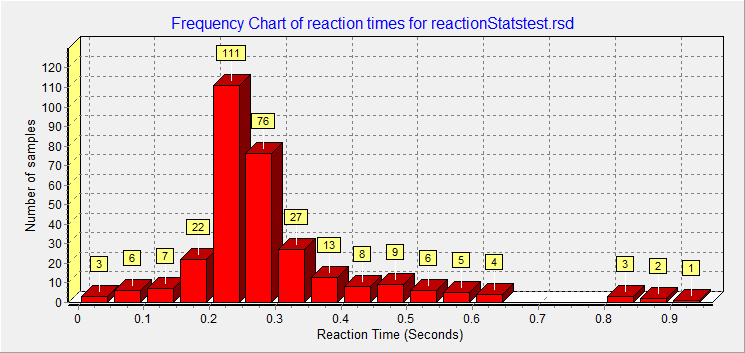
Addendum January 30,2004: A European user pointed out that my choice of comma as the field separator for the detail and summary statistics files was not a good one for countries that use commas for decimal points. I guess decimal points also substitute for commas in that system. I added an option to the Administration dialog to allow choice of delimiters used to separate fields. A small change was also required to ResponseStats to replace '*' and ';' delimiters with blanks. Addendum April 2, 2006: About once a year I hear from a high school or college student trying to use ReactionTimes program for a project. This year, it's a high schooler who wants to compare aural vs. visual response times for his Biology II class. I added new audio trial option to the program. While working on the the changes, i found and hopefully fixed a few other functions that either didn't work or were awkward to use. ResponseStats used to require two input sample selections to perform Student's T test comparing the average response times. It now also accepts a single sample just to display simple statistics. New versions were posted today. Addendum February 6, 2008: Sure enough, another student wrote recently asking for help in getting the Frequency plot produced by he Density plot program in some form that she could insert into her project report. I hadn't even considered that problem, or that most students these days are using computers routinely to prepare reports and documents for school. The update today adds some additional chart formatting options (frequency or percent chart type, bar heights labeled or not, actual or cumulative bar heights). It also add button to print the chart or save it as a bitmap (BMP) file or as a Wimdows Metafile (WMF) file. Metafiles have the advantage of being much smaller than BMP files and they also may scale better when inserted into Word documents.
August 19, 2008: An instructor in the biology field wrote recently asking about the using our Reaction Times application , specifically about the Response Statistics analysis program. The program allows users to select specific trial data to form two sample data sets from which we can decide if they are likely from the same population, i.e. are the means of the response times of the two samples the same or different. She wants to introduce students to statistical testing as is looking at this application as a tool. I use Student's two sample T test statistics to display the results of the analysis, but had not been displaying the T Statistic values themselves. With this revision, I do. I also added text describing in more detail the statistics are being displayed and their interpretation. Response Stats download includes some sample tests results. (Most reaction times tests automatically save results summaries to a file). The "ResponseTimesAsterisk.rsp" file allows exploration of whether reaction time increases between ages 64 and 69 for a typical male subject (me). To find out, load the file into ResponseStats3.exe, select the three T1 trials from 2004 as Sample set 1, the two T1 trials run today as Sample set 2 and click the "Calculate Statistics" button. Addendum February 1, 2010: A couple of times each year I get a request for help from a student requesting help in some application. This year it was a graduate student in at a Medical School Ecuador whose thesis topic wants to test the effect of sleep deprivation by interns as result of the long hours they put in. Her problem turned out to be decimal separator confusion because the PC she was using happened to have the Window's Locale set for a European country. Changing back to Ecuador set it from comma back to dot. In the meantime, I discovered and fixed a problem with the ResponseStats program that kept a newly loaded response statistics file from being made available. ReponseStats Version 3.1 was uploaded today. January 6, 2011: ResponseTimes Version 3.1, posted today, fixes a bug which prevented the user from selecting file names other than the default "responsedetail.rsd" and "responsesumry.rsp" to save the detailed (.rsd) and summary trial (.rsd) test results. February 7, 2011: A team of graduate students at a Danish University Hospital are using ReactionTimes to study fatigue effects on reaction times of recovering stroke victims. Version 3.2 adds some new features they requested or that I thought might be useful:
March 21,2011: Version 4 includes a new type of response: JPEG images are displayed in a chosen sequeence and detail records written for each image, even if the response was early or late. This will allow a team of engineering students at the University of Singapore to associate specific images with response times to these images in their project about signage recognition. I have also cleaned up a few bugs involving case parameters not being saved and restored properly between runs, and added a new "Tone500X2.wav" sound file (2 second, 500 Hz, sine wave), to the sound resources for the Danish guys to see if their observed 40 ms lag between audible and visual stimuli is due to audio file load times. October 14, 2013: Changes were implemented today to better handle statistical analysis of results for countries which use comma as a decimal separator in floating point numbers (Europe and others) instead of the decimal point used in North America. Problems were previously encountered in the Reaction Stats program if comma was specified as the field separator in ".rsp" response summary files. The comma field separator is now generated in ReactionTimes V4.2 as comma-space character pair to distinguish it from the commas which occur within floating point number for European countries. ReactionStats V3.2 correctly parses the .rsp files under those conditions. Running/Exploring the ProgramNote: Downloads include sample reactions.ini, reactiontimes.rsp, reactiondetail.rsd and reactionStatsTest.rsd files.
Suggestions for Further Explorations
|
[Feedback] [Newsletters (subscribe/view)] [About me]Copyright © 2000-2018, Gary Darby All rights reserved. |