
[Home] [Puzzles & Projects] [Delphi Techniques] [Math topics] [Library] [Utilities]
|
[Home] [Puzzles & Projects] [Delphi Techniques] [Math topics] [Library] [Utilities]
|
|
Beginners often need "bootstrap" examples to get them started. I've written dozens of these simple apps to provide this kind of sample code over the years. This page may provide a place to post those that seem most useful. Recently I've received several requests for help with a few Delphi techniques that are not too difficult once you do one. Here are the current offerings:
Features and techniques illustrated are used in a number of programs on DFF, but it's easy to lose the essential characteristics in programs that may have 1,000 or more lines of code. Each of these programs contains less than 100 lines. Scroll down to see all offerings. Image Manipulation (Parking Lot)
Click here to download Parking Lot Simulation source code
TChartDemo1 and TChartDemo2
Addendum December 2, 2005: A viewer recently asked about getting user input data from a list box or memo into a chart. Here's TChartDemo2 which shows a few additional techniques for charting user data. It includes a "missing" Delphi function, StrToFloatDef. which tries to convert an input string to a floating point number and returns either the numeric value of the string or a default value if the input string does not represent a valid number. Click here to download TChart Demos source code
BackTracking
Click here to download Backtracking Demo source code
DrawDice (June 8, 2005)
CountWords (June 8, 2005)How do you count words in a text document? Like loving a porcupine - very carefully. Here's simple start though, with a Getword routine which looks for a predefined set of delimiters marking the ends of words. Words from a text file are extracted and listed. There is also a Summarize button that accumulates number of occurrences by word. Click here to download CountWords source code.
Expressions864 (June 8, 2005)Find all solutions where the sum of two numbers equals 864. And by the way, the Click here to download Expressions864 source code.
Allwords (September 30, 2005)Given a letter string, find all possible subsets of letters ("words") that can be formed. Optionally, list only words that can validated against a given dictionary. This code is fairly simple because it uses two other pre-built units as helper "tools". UComboV2 contains the class which generates the permutations which help us form the words. UDict contains the dictionary class that lets us validate our trial words. Click here to download AllWords source Click here to download AllWords executable
MemLeakDemo
Even though the use of records and pointers is less critical today than in the pre-object days, some schools still teach their use.
And the use of record pointers in the objects field of TStringlists is
sometimes convenient. Click here to download MemLeakDemo source
Draw Olympic Rings (February 15, 2006)
Click here to download Draw Olympic Rings source Click here to download Draw Olympic Rings executable
Simple Cipher (March 12, 2006) We have a decryption program elsewhere at DFF which checks all possible substitution ciphers and check results against a dictionary to determine success. The problem is, this approach can run for hours, and if the text contains words not in the dictionary, may not succeed at all. My Mensa "Puzzle-A-Day" calendar periodically contains messages encrypted with a simple "shift cipher", also known as the "Caesar Cipher" because Julius Caesar used it to encrypt message in ancient Roman times. In the shift cipher, each letter is replaced by a letter at some fixed distance away in the normal "abcd..." listing of letters. For example, if all plain text "a"s were replaced by "c"s, then "b"s, becomes "d"s, "c"s becomes "e"s etc. to produce the encrypted text. It takes less than 40 lines of user written Delphi code to scan lines of input text using all 25 possible encryption choices (26 if you count the one that maps each letter back to itself). You provide the dictionary check scanning the outputs to determine which one is correct. And, of course it will encrypt as well as it will decrypt! Click here to download Simple Decrypt source Click here to download Simple Decrypt executable
Digit Sums (September 12, 2009) A recent Mensa puzzle calendar asked "How many 4 digit numbers are there whose digits sum to 34?" That one is not too difficult since the sum cannot exceed 36 (for the integer 9999), but it started me thinking about other sums. This program counts and lists the number of integers of given length which sum to any value. About 25 lines of user written Delphi code answer the question for two through five digit integers. For programmers, the code will clarify how to extract individual digits from an integer. Also, after the last line is added to the output display memo, how to force the top line back into view. Click here to download Digit Sums source Click here to download Digit Sums executable
Reversed Words (September 24, 2009) Another 25 line program from a recent Mensa calendar puzzle page. We are asked to find a 7-letter word which appears reversed in text lines and which meet a given definition. It was surely more fun to write a program than to manually search the text for the word. I divided the problem into two parts:
Click here to download Reversed Words source Click here to download Reversed Words executable
The 3N + 1 Problem (January 17, 2010) There is a website at http://uva.onlinejudge.org/ which provides a virtually unlimited supply of programming problems used to train for annual ACM Programming Contests. I am not fond of the quasi competition provided by the Online Scoring facility at the site for a couple of reasons; Free Pascal is the only Pascal family language supported and 2) your program is run against an unknown set of inputs and feedback is not helpful in debugging ("Wrong answer"), leaving one to guess about the nature of the problem. This does simulate the contest environment, but as a learning tool leaves much to be desired. The problems themselves however seem to be well done and provide lots of mental challenges while developing and implementing solutions. This problem is first in the set of problems. It is an unproven conjecture that, staring with a positive integer, the sequence obtained by applying these rules below will always degenerate to a final value of 1. Rules to generate entry i+1 are:
The problem has been extensively studied as the Collatz Conjecture, See this Wikipedia entry for more information. This program has about 50 lines of user written code to collect the input values, evaluate the solution, and display it. There is lots of room to explore here. For example:
Click here to download ThreeNPlus1 source Click here to download ThreeNPlus1 executable
The Executive Bathroom (April 14, 2010) The entry code for the executive bathroom is a three-digit odd number with no repeated digits. If you want to try to break in, what is the maximum number of entry codes you'll have to try? (Remember that three-digit numbers cannot start with zero.) Source: The Mensa Puzzle Page-A-Day Calendar for April 12, 2010. It only takes 15 lines of code to determine and display the answer. I
also included the Mensa Calendar explanation as a hidden memo that becomes
visible after the program solution is displayed. Click here to download Executive Bathroom source Click here to download Executive Bathroom executable
Two problems, each with exactly two solutions. Solving each required only 10 to 15 lines of code. Here are the questions:
Click here to download Twofers source Click here to download Twofers executable
Digit Products (June 18, 2010) Less than 20 lines of code solves this extension of a Mensa Puzzle-A-day Calendar puzzle:
Among the 2 and 3 digit positive integers, there are one or two which are
equal to the product of their digits for some multiple from 2
through 9. Find them.
April 29, 2011: Three additional problems were added today in Version 2.
These are from
Math and Logic Puzzles for PC Enthusiasts Click here to download DigitProducts source Click here to download DigitProducts executable
Pecking Order (February 12, 2011) The first problem in my latest addition to my library, "Challenging Mathematical Teasers", is algebraic and poetic at the same time: Pecking Order
Four sparrows found a dish of seed,
Defining the equations, substituting, and calculating the coefficients should be enough to solve it algebraically, but one slip will lead to a dead end. This "trial and error" solver program was quicker and surer way to the answer for me. About 30 lines of code finds the answer in a millisecond or so. Click here to download Pecking Order source Click here to download Pecking Order executable
Squared Chess Pieces (May 17, 2011) 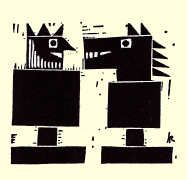
A modernistic chess set has pieces in various geometrical shapes. In
particular, both the KING and the KNIGHT are squares of integers. What
numbers could these represent if each letter is replaced by a different
digit? (From
Mathematical Bafflers I had said that finding the solution would be very hard without the help of a computer but Dunn's solution is feasible. Using the fact that the square root of KING must be between 32 and 99 (because the square must have 4 digits) and by checking them all, she find that there are "only" 36 whose squares contain no duplicate digits. Plugging those into KNIGHT, we could find only one value for G and T which make KNIGHT a perfect square. No, I still think that would be very hard and that my 35 line solution is quicker and less tedious! This program will require downloading the DFF Library zip file to gain access to UCombosV2, a unit that will let easily generate and test the 151,000 ways to select 6 of 10 digits to find which of them provides the solution. Click here to download Squared Chess Pieces source Click here to download the latest DFF Library zip file (DFFLibV15) Click here to download Squared Chess Pieces executable
DictionaryWord Search (July 28, 2013)
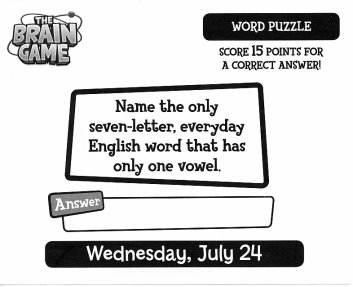
It only took 50 lines of user written code to prove that the solution given for this "Word Search" puzzle is not as unique as the author thought! I used our Dictionary object to find all the 7 letter words which contain a single vowel. If we do not consider "Y"s to be vowels, there are over 200 solutions! You will need the dictionary unit from our Library Zip file to recompile the program. I have included our largest dictionary (file Full.dic with about 62,000 words) in the executable download. Click here to download Word Search source Click here to download the latest DFF Library zip file (DFFLibV15) Click here to download Word Search executable
Counting Empty Grid Cells (February 28, 2014) A viewer working on a playback program for Chess games was having trouble building the keys for each rank using FEN notation. FEN uses letters for the chess pieces (P for Pawn, B for Bishops, etc.) and numbers to represent the count of consecutive empty cells. He didn't tell me that that was the objective though until I had written this little demo program which builds keys based on randomly placed letters on an 8x8 grid. As a bonus, I finally took time to develop a simple way to remove that irritating highlight color that is drawn for every selected cell in a TStringGrid. I like so much that I plan to add it to our DFFUtils utility library unit. Download CountGridCells source Download CountGridCells executable
Copy File Deleting and Truncating Strings (August 30, 2014) Here's an email I received the other day: In my file is hundreds lines of tekst ... I have to cut each line to length 199 is smaller line, let it be delete from file and finally let program save new 'situation' of text ... If string is longer than 199 let it be cut to 199 of length ... May I ask U for help? Dont know how to start with... TStringlist? Clearly not a native English speaker but I guarantee that his English is better than my version of his native language would be! I believe he wants to delete lines less than 199 characters long and save all the others, truncating them to 199 characters if they are longer. I suggested using procedures Readln and Writeln procedures to copy the records, acting on each line as required. The barebones program below has about 15 lines of code to accomplish this using fixed input and output file names and defining "short" records and less than 40 characters. Another 10 lines or so counts and displays input, deleted and written record counts. The Delphi source code is provided as the sample "My Input File.txt" file. Download CopyTruncatedStrings source and executable
Pancake Odds (September 30, 2014) Marilyn Vos Savant of Parade magazine fame published a probability problem aboit selecting really good pancakes if some are burned on one or both sides. It took just 25 lines of code to calculate the answer (and varify that once again, Marilyn got right)! Download PancakeOdds executable
State Abbreviation Search (May 31, 2015) A surprising number of U.S. state names contain multiple pairs of letters which form standard two-letter state abbreviations. For example ALABAMA contains two: AL and MA (Alabama and Massachusetts). If we disallow overlapping abbreviations, there is only one state name that contains four abbreviations. This 50 line program finds it using "Name=Value" type of TStringLists. Source: The Mensa Puzzle Calendar entry for May 30,2015. Download StateAbbreviationSearch source Download StateAbbreviationSearch executable
|
[Feedback] [Newsletters (subscribe/view)] [About me]Copyright © 2000-2018, Gary Darby All rights reserved. |


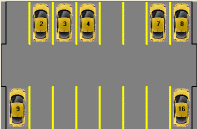 The Image program is a "Parking Lot Simulation" that draws some
parking spaces on the canvas of a TImage control. Clicks on the
spaces then show or hide automobile pictures in the spaces. A TImage
has the advantage over a TPaintBox because it can refresh itself when
necessary. Once the canvas has been drawn or modified, the image will be
managed by TImage redrawn without our help if the image is moved or minimized or
has other forms popup over it. This is not the case with
a TPaintBox where it is the programmer's job to make sure that it knows
how to repaint itself at any time.
The Image program is a "Parking Lot Simulation" that draws some
parking spaces on the canvas of a TImage control. Clicks on the
spaces then show or hide automobile pictures in the spaces. A TImage
has the advantage over a TPaintBox because it can refresh itself when
necessary. Once the canvas has been drawn or modified, the image will be
managed by TImage redrawn without our help if the image is moved or minimized or
has other forms popup over it. This is not the case with
a TPaintBox where it is the programmer's job to make sure that it knows
how to repaint itself at any time.
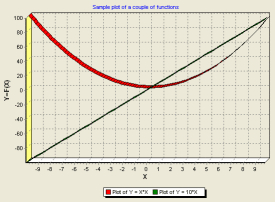 TChart is a powerful graphing and charting facility distributed with
most versions of Delphi. It is so powerful that the hundreds of
options can be rather intimidating for the beginner. Fortunately most
features have reasonable defaults and need not be changed. Most of the
rest can be defined a design time in a TChart Edit component that is accessible
by a right click or double click on the TChart control image on the form. Any of the
properties can also be defined at run-time. In this demo, TChartDemo1,
line plots of
two functions are drawn and some of the titles etc. are set via code just to
illustrate the technique.
TChart is a powerful graphing and charting facility distributed with
most versions of Delphi. It is so powerful that the hundreds of
options can be rather intimidating for the beginner. Fortunately most
features have reasonable defaults and need not be changed. Most of the
rest can be defined a design time in a TChart Edit component that is accessible
by a right click or double click on the TChart control image on the form. Any of the
properties can also be defined at run-time. In this demo, TChartDemo1,
line plots of
two functions are drawn and some of the titles etc. are set via code just to
illustrate the technique.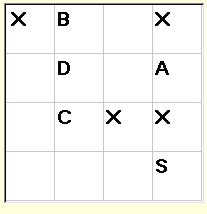 Four
cells in a 4 x 4 array are randomly loaded with the letters 'A', 'B', 'C', and
'D'. Four additional cells are loaded with the letter ''X' - these are
blocked cells and may not be occupied. The other 8 cells may be passed through
while picking up the A, B, C, D cells. We need to find a path from
'S' through all of the A, B, C, D cells by moving horizontally and
vertically and without visiting any square twice.
Four
cells in a 4 x 4 array are randomly loaded with the letters 'A', 'B', 'C', and
'D'. Four additional cells are loaded with the letter ''X' - these are
blocked cells and may not be occupied. The other 8 cells may be passed through
while picking up the A, B, C, D cells. We need to find a path from
'S' through all of the A, B, C, D cells by moving horizontally and
vertically and without visiting any square twice.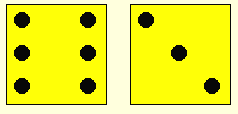 A simple program to draw
two random dice each time a button is clicked.
A simple program to draw
two random dice each time a button is clicked.  Every
two years. "Olympic Rings" leads the list of search phrases at
DFF. Drawing the rings in Delphi is an interesting drawing exercise,
especially if we want them to appear to be interlaced.
Every
two years. "Olympic Rings" leads the list of search phrases at
DFF. Drawing the rings in Delphi is an interesting drawing exercise,
especially if we want them to appear to be interlaced.
 , (J.J. Cleasa,
Dover Publications), originally published in 1983. Each of these is
solved with beginner's level code (30 user written lines or so). My
favorite is Problem 4 about the shopper who accidentally totaled her
purchases by multiplying instead of adding, but still got the correct total!
, (J.J. Cleasa,
Dover Publications), originally published in 1983. Each of these is
solved with beginner's level code (30 user written lines or so). My
favorite is Problem 4 about the shopper who accidentally totaled her
purchases by multiplying instead of adding, but still got the correct total!  , Angela Dunn, 1980, Dover
Publications. Used copies currently available via the above Amazon
link starting at $.01!)
, Angela Dunn, 1980, Dover
Publications. Used copies currently available via the above Amazon
link starting at $.01!)