Problem Description
This page describes a countdown timer
class and provides a demonstration program illustrating it usage.
Background & Techniques
A fan of our Akerue
program recently wrote asking for some updates. Akerue
is a word search program written in Turbo Pascal and released many
years ago by Borland as part of a games package. One
of the features not yet implemented is the time limit on user
searches. I rarely get more than 10 or 20% of the possible
words anyway, so the time limit feature didn't seem important, but
Adrian says she needs it just to reduce the number of hours she
spends searching for those last few words! In
any event, I could not find a good, free Delphi countdown timer so
I wrote this one.
TCountDown is a new class derived from TPanel
which uses a TPanel as a prototype at create time displays.
This is my alternative to user installed visual components.
I keep losing them with every new CPU, operating system, or Delphi
version upgrade, at least one one of which occurs annually.
This method allows one to visually drop the prototype component on
the form and define its characteristics and still be assured that
the program will compile successfully next year.
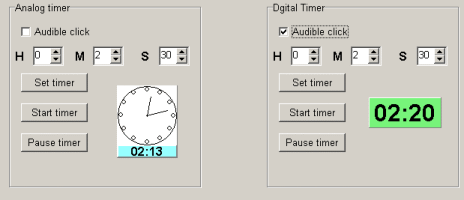
TCountDown has a digital or analog clock display with a number
of features, the essential ones being methods to set the time,
start the timer, and pause the timer. An
OnExpired event exit can notify the program when the timer
reaches zero. A new (February 2016) feature is an OmTimerPop
event exit which allows the programmer to gain access every time the 1 second
time timer pops.
The best way to learn the usage details
is to study the code. here are a few notes about
features which might not be obvious:
- A TPanel is passed to the create constructor as a prototype
for the timer. Location, size, font, etc. are inherited
from the prototype. This allows us many of the visual
development advantages without the hassles involved with
installed user components.
- If an analog clock timer type is used (analogClock := true),
the prototype panel height is compared to its width. If height
exceeds width by enough to display the timer in at least 6 point
type, the times will be displayed in digital as well as analog
form.
- An OnExpired notify event exit is available to tell
the user when time has counted down to 0. By default, the
OnExit event of the prototype is used as the OnExpired
event.
- The "click" sound effect is loaded as a memory resource at
create time. ClickSound.res included with the
source download is created from wave file Click2.wav by
the resource compiler called by Genres.bat and as defined
by Clicksound.rc all included in the source file but only
ClickSound.res is required to recompile unless you wanted
to substitute your a own preferred click sound.
Addendum June 21, 2006: I
recently wanted to use the timer to display run time for a long
running program. Version 2 adds a feature to allow the
timer to run up or down so it can be used for this purpose. The CPU intensive program being timed,
also uncovered a problem with the original timer - it
ran slow because on the timer code could not always execute at one second intervals. The new version displays the time
since the the timer was started rather than counting on 1 second
timer updates.
February 21, 2016: Version 2.1 of the demo program tests the new
OnTimerPop event exit in TCountDown by "beeping" the speaker for
each change in the Minute of the displayed digital time value (i.e. beep each
time the displayed Second value is 0).
Running/Exploring the Program