Search
As of October, 2016, Embarcadero is offering a free release
of Delphi (Delphi
10.1 Berlin Starter Edition ). There
are a few restrictions, but it is a welcome step toward making
more programmers aware of the joys of Delphi. They do say
"Offer may be withdrawn at any time", so don't delay if you want
to check it out. Please use the
feedback link to let
me know if the link stops working.
Support DFF - Shop
If you shop at Amazon anyway, consider
using this link.
We receive a few cents from each
purchase. Thanks
Support DFF - Donate
If you benefit from the website, in terms of
knowledge, entertainment value, or something otherwise useful,
consider making a donation via PayPal to help defray the
costs. (No PayPal account necessary to donate via credit
card.) Transaction is secure.
Mensa®
Daily Puzzlers
For over 15 years
Mensa Page-A-Day calendars have provided several puzzles a year
for my programming pleasure. Coding "solvers" is most fun,
but many programs also allow user solving, convenient for "fill
in the blanks" type. Below are Amazon links to the
two most recent years.
Mensa®
365 Puzzlers Calendar 2017
Mensa®
365 Puzzlers Calendar 2018

(Hint: If you can
wait, current year calendars are usually on sale in January.)
Contact
Feedback:
Send an
e-mail with your comments about this program (or anything else).
|
| |  Writing code to move things around on screen always seems more
difficult than it should be. Windows creates the illusion that
displayed objects are layered with closer things sitting on top of
more distant things. We "grab" and "drag" on-screen
objects every day. Objectively, we know that there is only one layer of
pixels on the screen and making something "move" around must
require some
behind the scene tricks. And that's the topic of this page. Writing code to move things around on screen always seems more
difficult than it should be. Windows creates the illusion that
displayed objects are layered with closer things sitting on top of
more distant things. We "grab" and "drag" on-screen
objects every day. Objectively, we know that there is only one layer of
pixels on the screen and making something "move" around must
require some
behind the scene tricks. And that's the topic of this page.
I do not claim
much expertise in this area. I do
like to experiment and animation provides lots of
opportunities for that. Making objects move on the screen is
similar to making one of those "Claymation" movies created by taking a series of
still pictures, moving the figure a small amount between
shots. All of the techniques tried here use the same loop for
the animation:
 | Compute new locations for the sprites. |
| Erase the sprites at
their old locations. |
| Draw the new sprites at their new
locations. |
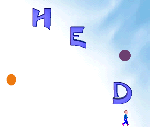
The programs below include some ellipses and letters that
float randomly around the screen. I don't have an "official"
definition for the term "sprite" - they definitely move about the
screen and are usually non-rectangular. Must they include multiple
images to imitate some internal motion (walking, flying,
etc.)? Not sure. Just to be safe, I've included a "walking man" sprite that uses
six different images to give the illusion that his legs are
moving. Masking and Transparency
If we try drawing sprites without using masking, the visual aspect of all of your
sprites had better be rectangles. Windows drawing routines only
know rectangles, so the trick is to let the background show through those areas
of of our rectangular sprite that are not supposed to be there.
Masking is the technique that accomplishes this. Delphi has
simplified masking by including the mechanics into several of it's visual controls, so if you find
a Draw method and a Transparent Color property, you're in business.
I may do a "behind the scenes look" at this magic trick one of
these days. (Sept 11: Done! See Masking
Unmasked! for more information.) Drawing
techniques
In these programs I tried combinations of several variables to
draw each frame:
| Drawing surface - Timage or TPaintBox |
| Build each new frame on-screen or in an off-screen work bitmap. |
| Image storage - Array of TBitmaps or TImageList |
| Redraw strategy -
 | Redraw full background and redraw all sprites |
| Redraw the background only over the rectangles that contain sprites
in their previous location, then redraw sprites in their new locations. |
| Build a large enough rectangle to enclose old and new sprite locations
and redraw that. |
|
The Programs
There are five source programs are
available below for downloading. They are all similar with variations of the parameters described above.
| Sprites1 uses the
simplest possible approach - for each "frame" we redraw the
entire background on a TImage component and then redraw the individual
sprites. Information is held in a TSpritesRec record that contains the
bitmap of the image together with information about where it is now and where it
will be displayed next. |
| Sprites2 speeds drawing
somewhat by copying only pieces of the background over old sprites to erase them
and then copying the sprite rectangles in new positions. |
| Sprites3 uses Sprites2 strategy but moves the sprite image information to a
TImageList and uses the imagelist Draw method to put the
sprite in the image canvas. These first three programs all include a
"Double Buffer" checkbox to turn on the form's DoubleBuffer
option. In theory, drawing directly on the TImage canvas should
cause an annoying flicker as it is redrawn. In Delphi version 6
it does, in D5 it does not. There must be some code in D5's TImage
prevents it. I guess it was a "bug" that Borland
"fixed" in D6. |
| Sprites4 switches the drawing surface from TImage to a TPaintBox
control. Now double buffering is definitely required. We will
accomplish this by creating a TBitmap, Work, to hold the image
as it being built. Once built we can use it to replace the currently
displayed image without visible flicker. In this version,
I used the simplest strategy described above - copy the background to the
work image, draw the new sprites on the work canvas, copy the work canvas to
the paintbox canvas. |
| Sprites5
is the fastest and takes us one step further. Now we'll replace only the
rectangles that contain the old sprite images with corresponding
background rectangles, then draw the sprites in their new location on
the Work bitmap. Now, since we cleverly saved the old image rectangle
and the new image rectangle, we can define a new super rectangle that just
encloses both Prevrect and NewRect and use that to copy pieces
of the work canvas to the onscreen Paintbox canvas. Especially when the number
of sprites is small, this is very fast. There is a Sprites6 not
posted here that
uses a TImageList to hold the sprites. Sprite5 uses arrays to hold the
sprite bitmaps and is slightly faster than Sprites6. |
Performance
I measured the maximum measured frame rates for the five programs
with 2 and 14 sprites displayed and on three of my computers. Results are
shown in the table below. Upstairs is
an 800mhz Celeron system with a 32mb AGP video car driving a monitor at 1024X768
resolution. Downstairs is a 433mhz Celeron with a 2X AGP video card and driving
800X600 resolution, Basement is a 300mhz AMD K6 with a S3 PCI video card driving
a 100 year old 640X480 Dell VGA monitor. The two numbers in each box
are the maximum observed frames per second with 2 sprites and 14
sprites running.
| |
Sprites1 |
Sprites2 |
Sprites3 |
Sprites4 |
Sprites5 |
| Upstairs |
60,54 |
212,103 |
256,166 |
258,166 |
1662,322 |
| Downstairs |
68,45 |
94,77 |
130,77 |
148,88 |
682,114 |
| Basement |
67,34 |
245,48 |
222,91 |
324,108 |
518,70 |
Frames per second for several programs and systems
(2
sprites, 14 sprites)
Pixelformat and other anomalies
While taking these measurements, I noticed a few anomalies that
deserve more study. The Aopen PA3000 video card driver on Upstairs seems
not very well behaved for some operations, Sprites3 and Sprites4
both start out with very high calculated frame rates even though the sprites are
not moving exceptionally fast, as if the card is caching the
requests in its own memory and returning to the program before the operation is
complete. Once that cache is full, the program becomes very
non-responsive to button clicks (until the cache catches up I
assume). Further information - the problem is related to
the pixel format of the background image. When loaded from the resource
file, the bitmap type is DDB (device dependent bitmap) and the Pixelformat
property is set to pfDevice. When I change Pixelformat to the
current screen Pixelformat, the response problems disappear, but frame
rates are somewhat slower. Opting for usability over speed, I am
setting Pixelformat to match the screen color depth in all five
programs. Comment out the statement bg.pixelformat:=pixelformat;;
in the FormCreate method to see the effect on your
system.
Also, on the old Basement system, the full
redraw TPaintBox program, (Sprites4) outruns partial redraw TPaintBox program (Sprites5) for the 14 sprites
case. This probably reflects the relative power of the VGA card in
drawing over the AMD processor in recalculating which pieces to
redraw.
Additional Features
There are a number of other techniques used here that I may want to
reference one day. I'll mention them here so that Google can index them for
me.
| Adding bitmaps to a resource and loading bitmaps from a resource, |
| Using OnResize exit to adjust displayed
image sizes, |
| Controlling the speed of an animated sprite. The
walking man moves much too fast if images are changed for each frame,
I defined a ManRest variable to control how many frames pass before
the man image changes. |
| Getting the bits per pixel for the current display screen
using GetDC and GetDeviceContext API calls, (See demo program
Sprites3) |
| Use of QueryPerformanceCounter and QueryPerformanceFrequency
API procedures to calculate frame rates. |
| The Tag property is used as a "Stop" flag
to tell the animation to quit. |
| Using OnCloseQuery exit to set the "Stop"
flag to allow graceful program exits when the animation is running. |
| Using the Sleep procedure to control animation
speed. |
| Saving a bitmap image to disk with a unique name.
(Commented in Sprites1 after use to make the image at the top of this page.)
image1.picture.bitmap.savetofile(extractfilepath(application.exename)
+ 'Spritepic'+ inttostr(trunc(now*secsperday)) + '.bmp'); |
Downloads
Download source code for programs Sprites1 - Sprites5
Download bitmaps and files to build a resource.
(Not
required to compile or run the programs above. The image resource file, Sprites.res,
is included
with the source download.)
Areas for Further Exploration
 |
I included a separate speed control for the little
man and spent too much time trying to keep him from getting hit by the
flying sprites. It could a good first game. With a
little more work, the guy could back up or jump. And we would need
some collision detection. Difficulty levels could be controlled by
the number and speed of the "attack" sprites. Scoring
could be based on time between hits (plus points) and hits (minus
points). |
|
The letters included spell a word - it would be cool to
have the letters gradually come to a halt forming the word across the
center of the display after a minute or
so. |
| Created: September 8, 2002 |
Modified:
May 15, 2018
|
|