Problem Description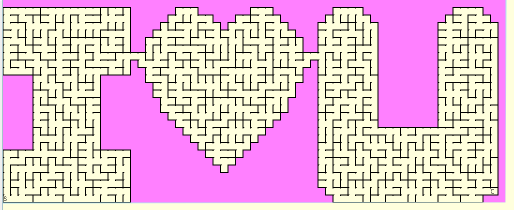
Here's a Maze Generator program that's kind of
fun. You can generate, solve, and save mazes of varying sizes and
shapes. A set of letter shaped mazes is provided that can be concatenated
(strung together) to make a "name-maze" of your favorite
person.
Some more advanced code too.
Background & Techniques
The program has options to control "room" sizes and the number of rooms
across and down. A Generate button creates a random path from S
(Start) to E (End) along with a number of dead end false paths. The
Design button allows you to define border rooms; blocked out areas of the
maze, and saved mazes may be concatenated together to form words or mazes like
the example above. Additional options allow customizing colors, path
width. Completed mazes may be solved on-screen or printed with or without
the solution path displayed.
Non-programmers are welcome to read on, or may skip to
the download section at the bottom of this page.
Notes for Programmers
This is a fairly large program, probably 2,000 lines of
code. A thorough discussion would fill a book, so I'll just hit
the high spots here.
A TMaze class in a separate U_TMaze unit contains the logic for most
maze operations. MakeImage procedure generates a random path
through the maze from Startpoint to Endpoint, making sure
that it doesn't double back on itself. Then MakeFalsePaths is
called to open up additional walls by generating paths starting at right angles
to the solutions path. Again each path must remain independent of other
paths, i.e. never knock down that last wall connecting two paths.
Optionally, MakeOpenRooms can be called to remove at least one wall of any remaining
closed rooms, just to make finding the solution a little more
difficult. The TMaze mouse routines (Mmousedown, Mmousemove,
and Mmouseup), allow the user to click and/or drag the solution
path. Surprisingly, these were the hardest to debug. The
trick is to size the program window and the code window so that they don't
overlap. This allows stepping through code and observing the onscreen
results without the debugger getting in the way.
Design mode allows the user to generate mazes of
any size or shape. Clicking on rooms in design mode toggles between normal
and "border" rooms. Right-click triggers a pop-up menu
which provides other control options. You can also shift-left click
to invert a rectangular range of rooms from the previous clicked to the current.
TFileStream objects are used to save and reload
generated mazes. At reload time, mazes can be concatenated to
the current maze. A set of "letter" mazes is available for
download which can be used to make word or name mazes. Kids love
them. By the way, the letter maze files have the "read
only" attribute set, to avoid accidentally modifying them.
Maze also serves as an example of using Printer class and TCanvas Copyrect and Strecthdraw
procedures to implement print preview and print operations.
Margins can be set and header and footer text added to printed mazes.
Mazes can be scaled to fit on a single page or span several pages.
Addendum March 22, 2008: The changes today are primarily
for programmers who want to recompile Maze. Version 1 used
registered versions of my numeric edit components TIntEdit and TFloatEdit
to get numeric data from the user for cell size, board size and print margins. Since these are visual components,
they had to be installed before use which is not good for long lived projects. You can learn more
here about my
replacements which are created at program startup time and avoid the
problem of losing components when operating system, computer, or Delphi
versions. Version 2 uses the new versions. As usual a few minor
bugs found and corrected while testing the changes.
Addendum December 8, 2008: Version 3 has some
improvements in the way that larger mazes are scrolled and printed. Also
arrow keys may now be used to trace out the solution path when solving the
displayed version of a maze.
February 22, 2011: Version 3.1 fixes a memory leak and corrects a minor
problem noticed by one of our viewers. Multiple room moves made by
clicking on and in-line room several rooms away could not be completely erased.
I believe it is fixed now.
March 17, 2011: The same viewer who discovered the February bug has
been at it again, This time he found that paths drawn by mouse clicks
could, ghostlike, pass through maze walls as if they weren't there!
A one line fix to check for a wall before moving corrects the problem and was
posted today as Version 3.2. I
Running/Exploring the Program